Get Help
>>> help(str)
Help on class str in module builtins:

>>> help(str.find)
Help on method_descriptor:

find(...)
    S.find(sub[, start[, end]]) -> int

    Return the lowest index in S where substring sub is found,
    such that sub is contained within S[start:end].  Optional
    arguments start and end are interpreted as in slice notation.

    Return -1 on failure.
Collection
Lists, Tuples, Sets and Dictionaries
Summary
- Lists: containers to hold multiple elements in order
- Tuples: similar to lists, but immutable
- Sets: containers to hold multiple element when membership instead of order or position is important
- Dictionaries: key-value pairs
List highlights
# a list can hold elements of different types
>>> x = [1, 2, 3, "abc", [4, 5]]

# slicing is a widely used operation
# [start index: end index: step]
>>> x[3:1:-1]
['abc', 3]
# perform in place modification with slicing
>>> x = [1, 2, 3, "abc", [4, 5]]
>>> x[3:] = [4]
>>> x
[1, 2, 3, 4]
# in place 'filtering'
>>> x[:] = [e for e in x if e % 2 == 0]
>>> x
[2, 4]


# in-place sort vs. returning a sorted list
# in-place sort
>>> countries = ["China", "USA", "Australia"]
>>> countries.sort(key=lambda x: len(x))
>>> countries
['USA', 'China', 'Australia']
# sorted built-in function returns a sorted list
>>> countries = ["China", "USA", "Australia"]
>>> sorted(countries, key=lambda x: len(x))
['USA', 'China', 'Australia']

# shallow copy vs. deep copy
>>> l1 = [["x"], "y"]
# shallow copy via slicing
>>> l1_sc = l1[:]
# deep copy
>>> import copy
>>> l1_dc = copy.deepcopy(l1)
Tuple highlights
# `,` is needed for single element tuple
>>> type((1,))
<class 'tuple'>
>>> type((1))
<class 'int'>

# tuple may be immutable, but NOT hashable
>>> x = (1,2,[3])
>>> type(x)
<class 'tuple'>
# tuple itself is immutable, but its content may be mutable
>>> x[2].extend([4,5])
>>> x
(1, 2, [3, 4, 5])

# swap variable values with tuple and packing/unpacking
>>> x = 5
>>> y = 23
>>> x,y = y,x # y,x is packed into a tuple and then unpacked for assignment
>>> x
23
>>> y
5
Set highlights
# items in a set must be both immutable and hashable
>>> set((1,2,3))
{1, 2, 3}
>>> set((1,2,[3]))
Traceback (most recent call last):
  File "<stdin>", line 1, in <module>
TypeError: unhashable type: 'list'

# duplicate items are removed when adding to set
>>> s = {1,2,3,4,5,2,3}
>>> s
{1, 2, 3, 4, 5}
>>> s.add(5)
>>> s
{1, 2, 3, 4, 5}

# a set itself is not immutable and hashable
# to put a set inside another set, use frozenset
>>> {1,2,3,{4,5}}
Traceback (most recent call last):
  File "<stdin>", line 1, in <module>
TypeError: unhashable type: 'set'
>>> {1,2,3,frozenset({4,5})}
{frozenset({4, 5}), 1, 2, 3}
Dictionary highlights
# widely used `items` function
>>> for k,v in {"China": 5, "USA": 3}.items():
...     print(f"{k} --> {v}")
...
China --> 5
USA --> 3

# to delete an entry, use `del`
>>> d = {"China":5, "USA":3}
>>> del d["USA"]
>>> d
{'China': 5}

# provide default value when the key does NOT exist in the dict
# `dict.get(key, dflt_val)`
# `dict.setdefault(key, dflt_val)`
>>> d = {"China":5, "USA":3}
>>> d.get("Japan", 5)
5
>>> d.setdefault("Korea", 5)
5
>>> d["Korea"]
5
Dictionaries can be used as caches to avoid recalculation
cal_cache = {}
def calc(param):
    if param not in cal_cache:
        # calculate and then store the result into cache
        result = calculate(param)
        cal_cache[param] = result
    return cal_cache[param]
Comprehension
Don’t loop if a comprehension can do it cleaner.
# list comprehension
>>> [e*e for e in [1,2,3]]
[1, 4, 9]

# set comprehension
>>> {e*e for e in {1,2,3}}
{1, 4, 9}

# dict comprehension
>>> {k.upper() : v*2 for k, v in {"a":1, "b":2}.items()}
{'A': 2, 'B': 4}
Strings
Strings can be treated as sequences of chars, so operations like slicing can be performed on strings.
>>> "Hello"[-1::-1]
'olleH'
Numeric and unicode escape sequences can be used to present strings.
>>> "\x6D"
'm'
>>> "\u2713"
'✓'
>>> '\u4F60\u597D'
'你好'
Strings are immutable so methods return new strings, although they look like updating the string contents in place.
>>> "hello, world".title()
'Hello, World'

>>> "C++++".replace("++","+")
'C++'
The string module defines some useful constants.
>>> import string
>>> string.digits
'0123456789'
>>> string.hexdigits
'0123456789abcdefABCDEF'
>>> string.whitespace
' \t\n\r\x0b\x0c'
>>> string.ascii_lowercase
'abcdefghijklmnopqrstuvwxyz'
Formal string representation vs. Informal string representation
repr: formal string representation of a Python object. The returned string representation can be used to rebuilt the original object, just like serialization/deserialization. It’s great for debugging programs.str: informal string representation of a Python object. It’s intended to be read by humans.strapplied to any built-in Python object always callrepr
>>> repr([1,2,3])
'[1, 2, 3]'
>>> str([1,2,3])
'[1, 2, 3]'
String interpolation is available since version 3.6. It’s called f-string.
>>> value = 523
>>> f"The value: {value}"
'The value: 523'

# function can be called
>>> lang = "go"
>>> f"The next one: {lang.upper()}"
'The next one: GO'
Bytes
String vs. Bytes
- A string object is an immutable sequence of Unicode characters.
- A bytes object is a sequence of integers with values from 0 to 256, mainly for dealing with binary data.
Two confusing items
- unicode: a set of characters
- utf-8: an encoding standard, which is used to present unicode. With different encodings, unicode will be presented with different values.
>>> c = "\u2713"
>>> c
'✓'

# try different encoding
>>> c.encode(encoding='utf-16')
b"\xff\xfe\x13'"
>>> c.encode(encoding='utf-8')
b'\xe2\x9c\x93'

# encoded value back to string, and by default utf-8 is the encoding/decoding standard.
>>> b'\xe2\x9c\x93'.decode()
'✓'
Control Flow
The ’ladder’ structure is like below
if condition1:
   body1
elif condition2:
   body2
elif condition3:
   body3
...
elif condition(n-1):
   body(n-1)
else:
   body(n)
pass can be used if an empty body of if or else is neede.
if cond:
    pass
else:
    # do something else
A dictionary can be used to ease the ’ladder’ structure.
def take_action_a():
    # do something

def take_action_b():
    # do something else

def take_action_c():
    # do another thing

func_dict = {'a': take_action_a,
             'b': take_action_b,
             'c': take_action_c}

# populate the desired function key, and here simple assign 'a' for demo purpose
desired_func_key = 'a'
func_dict[desired_func_key]()
for Loop
for loop is different from the one in ‘C family’ programming langauges. In Python, for iterates over the values returned by any iterable object, so it’s more like an iterator, instead of a loop structure.
>>> for elt in [1,2,3,4,5]:
...     if elt % 2 == 0:
...         print(elt)
...
2
4
Unpacking is supported by for.
>>> for idx, val in enumerate(["A", "B", "C"]):
...     print(f"{idx}: {val}")
...
0: A
1: B
2: C
range, Generator and Memory Usage
When dealing with list holding large amount of elements, we may encounter the memory usage issue. Compare the memory consumption of a list and a range.
>>> import sys

>>> sys.getsizeof(list(range(1000000)))
8000056

>>> sys.getsizeof(range(1000000))
48
So using range or generator can reduce the strain on memory.
>>> x = list(range(1_000_000))
# using generator expression, we don't have to 'duplicate' the size of `x`
>>> g = (elt * elt for elt in x)
>>> import sys
>>> sys.getsizeof(g)
104
Boolean Values for Conditions
In Python
- 0 or empty values are
False. - Any other values are
True.
Some practical terms
- Values like
0.0and0+0jareFalse. - Empty String
""isFalse. - Empty list
[]isFalse. - Empty dictionary
{}isFalse. - The special value
Noneis alwaysFalse.
Some objects, such as file objects and code objects don’t have a sensible definition of 0 or empty element, so they should NOT be used in a Boolean context.
Some boolean related operators
inandnot into test the membershipisandis notto test the identityand,or, andnotto combine boolean values
Operators
==/!= vs. is/is not
Equality vs. Identity
==/!=: to test the equalityis/is not: to test the identity
>>> l1 = [1,2,3]
>>> l2 = [1,2,3]
>>> l1 == l2
True
>>> l1 is l2
False
and and or Used in Non-Boolean Context
and and or can be used in non-boolean context to ‘pick’ the object.
and: pick the first false object or the last objector: pick the first true object or the last object
>>> "a" and "" and "c"
''
>>> "a" and "b" and "c"
'c'

>>> "a" or "" or "c"
'a'
>>> "" or "" or "c"
'c'
Alternative to Ternary Operator ? :
Some programming languages provide the ternary opeator ? : such as below javascript code snippet
name = 1 ? "Yang" : "Yin"
console.log(name)
However, there is NO such ternary operator in Python. Python chooses a more readable style
>>> name = "Yang" if 1 else "Yin"
>>> print(name)
Yang
Functions
The basic function definition is like below
>>> def double(x):
...     return x * 2
...

>>> double(5)
10

# function without paramters
>>> def subroutine():
...     print("This is subroutine")
...
>>> subroutine()
This is subroutine

# function without explicit return
# in this case `None` is returned
>>> def no_explicit_return():
...     print("No explicit_return")
...
>>> r = no_explicit_return()
No explicit_return
>>> r is None
True
Parameters
Three available options for function parameters
- Positional parameters
- Named parameters
- Variable numbers of parameters
Named parameters help remove the ambiguity in some cases
>>> def power(base, exponential):
...     if exponential == 0:
...         return 1
...     else:
...         return base * power(base, exponential-1)
...

# using named parameter we know it's cube of 2, not square of 3
>>> power(base = 2, exponential = 3)
8
In addition, Named parameters help in the default value case
>>> def greet(message="Hello", name="world"):
...     print(f"{message}, {name}")
...

# use the default value of `message` parameter
>>> greet(name="NYC")
Hello, NYC
Variable numbers of parameters allow the function to handle arbitrary numbers of parameters. There is no method overloading in Python like the one in Java, and variable numbers of parameters can be used to mimic the feature. In addition, decorator pattern can be implemented with variable numbers of parameters.
def decrate(fn):
    def decorated_fn(*parameters, **key_val_pairs):
        print("Doing decoration tasks...")
        fn(*parameters, **key_val_pairs)
        print("End\n")
    return decorated_fn

def greet(message="Hello", name="world"):
    print(f"{message}, {name}")

decorated_greet = decrate(greet)
decorated_greet("Hi")
decorated_greet(name="NYC")
Functions as the First-class Citizens
Functions can be assigned to variables, just as other values in Python.
>>> def foo():
...     print("foo funciton!")
...
>>> fn = foo
>>> fn()
foo funciton!
Anonymous functions are implemented as lambda expressions.
>>> fn = lambda: print("bar function!")
>>> fn()
bar function!
>>> fn
<function <lambda> at 0x000002E3BDD3EB90>
High order functions are supported ’natively’, since functions are first-class citizens.
# a function can accept functions and return function
def combine(outer_fn, inner_fn):
    def combined_fn(*parameters, **key_values):
        return outer_fn(inner_fn(*parameters, **key_values))
    return combined_fn

def square(x):
    return x * x

dbl = lambda x: x * 2

double_of_squred = combine(dbl, square)
r = double_of_squred(5)
print(r)
Scope: global and nonlocal
Local variables vs. global variables vs. nonlocal variables
- local variables: variables defined in the function
globalvariables: variabels defined outside the functionnonlocalvariables: variables defined in the ’enclosing’ scope
Compare local variables and global variables.
a = 10

def foo():
    # global a
    a = 20
    print(f"a in foo: {a}")

foo()
print(f"global a: {a}")

# we get below result
#   a in foo: 20
#   global a: 10

# when `global a` is uncommented, we get below result
#   a in foo: 20
#   global a: 20
nonlocal refers to the one defined in the enclsoing function.
a = 10

def foo():
    a = 20
    def bar():
        nonlocal a
        a = 30
        print(f"a in bar: {a}")
    bar()
    print(f"a in foo: {a}")

foo()
print(f"global a: {a}")

# we get below result
#   a in bar: 30
#   a in foo: 30
#   global a: 10
Generator Functions
Besides generator expressions, there are generator functions to help on better memory usage.
# generator function
def gen_1_m():
    i = 1
    while i < 1_000_000:
        yield i
        i = i + 1

s = 0
for elt in gen_1_m():
    s = s + elt

print(s)
yield from can be used to delegate the generator to another generator.
g1 = range(1,500_000)
g2 = range(500_000,1_000_000)

def gen_1_m():
    yield from g1
    yield from g2

s = 0
for elt in gen_1_m():
    s = s + elt
print(s)
Modules and Scoping Rules
What is a module?
- a file containing Python code, which defines Pythong functions or objects
- name of the file defines the name of the module
Why use modules?
- for better organizing source code
- modules help avert name-clash issue. Suppose two people both define
greetfunction.module_a.greetmodule_b.greet
To use a module, import it first.
# import the built-in `math` module
>>> import math

# check the members of the module
>>> dir(math)
['__doc__', '__loader__', '__name__', '__package__', '__spec__', 'acos', 'acosh', 'asin', 'asinh', 'atan', 'atan2', 'atanh', 'ceil', 'comb', 'copysign', 'cos', 'cosh', 'degrees', 'dist', 'e', 'erf', 'erfc', 'exp', 'expm1', 'fabs', 'factorial', 'floor', 'fmod', 'frexp', 'fsum', 'gamma', 'gcd', 'hypot', 'inf', 'isclose', 'isfinite', 'isinf', 'isnan', 'isqrt', 'lcm', 'ldexp', 'lgamma', 'log', 'log10', 'log1p', 'log2', 'modf', 'nan', 'nextafter', 'perm', 'pi', 'pow', 'prod', 'radians', 'remainder', 'sin', 'sinh', 'sqrt', 'tan', 'tanh', 'tau', 'trunc', 'ulp']

# reference to `pi`defined in `math`
>>> math.pi
3.141592653589793
Another import form is from <module> import <member/*>
>>> from math import pi
>>> pi
3.141592653589793

# we can even import all members using `*`
>>> from math import *
>>> gcd
<built-in function gcd>
The Module Search Path
To make module files available to Python to import, put it under any path entries defined in sys.path
>>> import sys
>>> sys.path
['', 'C:\\Users\\Administrator\\AppData\\Local\\Programs\\Python\\Python310\\python310.zip', 'C:\\Users\\Administrator\\AppData\\Local\\Programs\\Python\\Python310\\DLLs', 'C:\\Users\\Administrator\\AppData\\Local\\Programs\\Python\\Python310\\lib', 'C:\\Users\\Administrator\\AppData\\Local\\Programs\\Python\\Python310', 'C:\\Users\\Administrator\\AppData\\Local\\Programs\\Python\\Python310\\lib\\site-packages']
Note
- The first module file found in the entries is used.
- If no desired module can be found, an
ImportErrorexception is raised.
How to define the path entries in sys.path list?
sys.pathlist is initialized based onPYTHONPATHenvironment variable if it exists.- Define
.pthfile to indicate the path entries, and put the.pthfile under the directory defined bysys.prefix
Scoping Rules and Namespaces
A namespace maintains the mapping from identifiers to objects. A statement like x = 1 adds x to a namespace and associates x with the value 1.
In Python there are three namespaces
- local: holding local functions and variables
- global: holding module functions and module variables
- built-in: holding built-in functions
When Python needs to ’locate’ the identifier, it follows below sequence
- Check local namespace.
- If the identifier doesn’t exist in local namespace, check global namespace.
- If the identifier doesn’t exist in global namespace, check built-in namespace.
- If the identifier doesn’t exist in any of above,
NameErroroccurs.
When a function call is made, a local namespace is created.
def foo():
    x = 1
    print(f"In foo locals: {locals()}")
    print(f"In foo globals: {globals()}")

y = 2
foo()
# on global level, locals() is equivalent to globals()
print(locals() == globals())
print(dir(__builtins__))

# executing above code snippet, we get
In foo locals: {'x': 1}
In foo globals: {'__name__': '__main__', '__doc__': None, '__package__': None, '__loader__': <_frozen_importlib_external.SourceFileLoader object at 0x0000013F1797C700>, '__spec__': None, '__annotations__': {}, '__builtins__': <module 'builtins' (built-in)>, '__file__': 'C:\\sandbox\\PythonLab\\Scripts\\lab.py', '__cached__': None, 'foo': <function foo at 0x0000013F178B3E20>, 'y': 2}
True
['ArithmeticError', 'AssertionError', 'AttributeError', 'BaseException', 'BlockingIOError', 'BrokenPipeError', 'BufferError', 'BytesWarning', 'ChildProcessError', 'ConnectionAbortedError', 'ConnectionError', 'ConnectionRefusedError', 'ConnectionResetError', 'DeprecationWarning', 'EOFError', 'Ellipsis', 'EncodingWarning', 'EnvironmentError', 'Exception', 'False', 'FileExistsError', 'FileNotFoundError', 'FloatingPointError', 'FutureWarning', 'GeneratorExit', 'IOError', 'ImportError', 'ImportWarning', 'IndentationError', 'IndexError', 'InterruptedError', 'IsADirectoryError', 'KeyError', 'KeyboardInterrupt', 'LookupError', 'MemoryError', 'ModuleNotFoundError', 'NameError', 'None', 'NotADirectoryError', 'NotImplemented', 'NotImplementedError', 'OSError', 'OverflowError', 'PendingDeprecationWarning', 'PermissionError', 'ProcessLookupError', 'RecursionError', 'ReferenceError', 'ResourceWarning', 'RuntimeError', 'RuntimeWarning', 'StopAsyncIteration', 'StopIteration', 'SyntaxError', 'SyntaxWarning', 'SystemError', 'SystemExit', 'TabError', 'TimeoutError', 'True', 'TypeError', 'UnboundLocalError', 'UnicodeDecodeError', 'UnicodeEncodeError', 'UnicodeError', 'UnicodeTranslateError', 'UnicodeWarning', 'UserWarning', 'ValueError', 'Warning', 'WindowsError', 'ZeroDivisionError', '__build_class__', '__debug__', '__doc__', '__import__', '__loader__', '__name__', '__package__', '__spec__', 'abs', 'aiter', 'all', 'anext', 'any', 'ascii', 'bin', 'bool', 'breakpoint', 'bytearray', 'bytes', 'callable', 'chr', 'classmethod', 'compile', 'complex', 'copyright', 'credits', 'delattr', 'dict', 'dir', 'divmod', 'enumerate', 'eval', 'exec', 'exit', 'filter', 'float', 'format', 'frozenset', 'getattr', 'globals', 'hasattr', 'hash', 'help', 'hex', 'id', 'input', 'int', 'isinstance', 'issubclass', 'iter', 'len', 'license', 'list', 'locals', 'map', 'max', 'memoryview', 'min', 'next', 'object', 'oct', 'open', 'ord', 'pow', 'print', 'property', 'quit', 'range', 'repr', 'reversed', 'round', 'set', 'setattr', 'slice', 'sorted', 'staticmethod', 'str', 'sum', 'super', 'tuple', 'type', 'vars', 'zip']
Interaction between Python Program and System
Combine Script and Module
A Python program can be treated as a script or a module depending on the execution context. The structure below does the trick.
if __name__ == '__main__':
    main()
else:
    # module-specific initialization code if needed
When the Python file is executed as Python script, its __name__ is set to __main__.
Commandline Arguments
The arguments passed from commandline can be retrieved via sys.argv.
import sys

def main():
    print(sys.argv)

main()
sys.argv is a list
- The first element is the name of the script file.
- The following elements are the arguments passed from commandline.
PS C:\sandbox\PythonLab\TempLab> python .\my_sciprt.py Hello World "Test Script"
['.\\my_sciprt.py', 'Hello', 'World', 'Test Script']

# omit `.\` to invoke the script file
PS C:\sandbox\PythonLab\TempLab> python my_sciprt.py Hello World "Test Script"
['my_sciprt.py', 'Hello', 'World', 'Test Script']
Use argparse module if more advanced features are needed to handle commandline arguments.
Filesystem Interaction
File Paths
Path related modules
os.path: before Python 3.5, and it’s imperative style.pathlib: since Python 3.5, and it’s OO style.
os.path provides a useful abstraction layer to ease operations on filesystems. For example, file path separator may be differnt from OS to OS.
\in Windows OS/in *nix OS
Using os.path.sep, we don’t have to worry about the difference. As a result, program with that abstraction layer
- use
os.path.curdir - NOT use
.
Unfortunately, there is no unified concept of root path. Think about the path types we have in Windows OS
C:\means the C drive\\myftp\share\means a UNC root path As a result, we do NOT have something likeos.path.rootin Python.
To form a path
# form a path with os.path
os.path.join("c:/", "Sandbox", "Temp")

# form a path with pathlib
# note `joinpath` of Path object is an instance method
pathlib.Path().joinpath("c:/", "Sandbox", "Temp")
pathlib.Path() / "c:/"/ "Sandbox"/ "Temp"
pathlib.Path("c:/") / "Sandbox"/ "Temp"
Filesystem Operations
Filesystem operations are performed via os module. Don’t get confused with sys module. Think ‘sys’ as ‘Python System’.
# change directory
os.chdir("My Target Dir")

# print current working directory
os.getcwd()

# list items in the directory
# Note in windows, we may encunter PermissionError if the dir is read-only
os.listdir(os.path.curdir)

# get file/dir info
os.path.exist(path_as_arg))
os.path.isfile(path_as_arg))
os.path.isdir(path_as_arg))
os.path.getsize(path_as_arg))
os.path.getatime(path_as_arg))

# renme file/dir
os.rename("original", "target")

# remove a file
# `remove` function cannot remove a directory
os.remove("file_to_be_removed")
# `rmdir` can remove an empty directory
os.rmdir("empty_dir_to_be_removed")

# create a directory
os.mkdir("dir_name")
os.makedirs("aut_create_intermediate_dirs")
If OO style is preferred, use pathlib module. With pathlib we create different objects to represent different paths, so we don’t do operation like pathlib_obj.chdir("Target Dir")
# create the obj representing the current dir
curr_dir = pathlib.Path()

# create the obj representing the specified path
root_dir = pathlib.Path("/")

# list the items in the directory
for fs_item in curr_dir.iterdir():
    print(fs_item) # fs_item is Path object as well

# print current working directory
# below two expressions return the same value
# note current working directory is determined by where we started Python program and if we switched to another dir later
curr_dir.cwd()
root_dir.cwd()

# get file/dir info
path_obj.exists()
path_obj.is_file()
path_obj.is_dir()
path_obj.stat()

# rename a file or directory
path_obj.rename("new_name")

# remove a file
path_obj.unlink()
# remove an empty directory
path_obj.rmdir()

# create a directory
path_obj.mkdir() # requires intermediate directories exist
path_obj.mkdir(parents=True) # intermediate directories will be created automatically
Utilities for Filesystem Operation
os.scandir provides an easy approach to get metadata of filesystem entries under a directory.
# use a context manager to ensure the file descriptor is released
# regardless of whether the iterator is full iterated
with os.scandir(os.curdir) as my_dir:
    for fs_entry in my_dir:
        print(f"{fs_entry.name}: {fs_entry.stat()}")
glob.glob provides the globbing functionality.
import glob
os.chdir("c:/sandbox/pythonlab/scripts")
py_files = glob.glob("*.py")

for py_file in py_files:
    print(f"Python File: {py_file}")
shutil.rmtree can remove a non-empty directory, and shutil.copyree can recursively make copies of all the files and subdirectories in a given directory.
import shutil

shutil.rmtree(nonempty_dir_to_be_removed)

shutil.copytree(src, dst)
os.walk(directory, topdown=True, onerror=None, followlinks=False) traverses directory structure recursively. The function returns three things
- root or path of the directory
- a list of its subdirectories (
os.walkwill be called on each subdir respectively) - a list of its files
for root, subdirs, files in os.walk("Test"):
    for file in files:
        print(f"file name: {file}")
    # remove backup directory from the recursion
    subdirs[:] = [e for e in subdirs if e != "backup"]
    print(f"Subdir list now is {subdirs}")
Note
- If
topdownis True or not present, the files in each directory are processed before moving to subdirectories. That means we have a chance to remove some subdirectories, such as.git/,.config/from the recursion.
File I/O
Open and Close Files
The classic open-process-close file operation is like below
file_obj = open("c:/temp/hello.txt")
print(file_obj.readline())
file_obj.close()
print(f"File closed? {file_obj.closed}")
Using context managers, we don’t need to explictly close the file.
with open("c:/temp/hello.txt") as file_obj:
    print(file_obj.readline())
Specify the mode to open file with
r: read mode, the default modew: write mode, data in file will be truncated before writing operationa: append mode, new data will be appended to the end of the filex: new file mode, it throwsFileExistsErrorif the file exists already+: read and write modet: text mode, the default modeb: binary mode, it supports random access
With above modes, we have
rt: read as textw+b: random accessing the file in binary mode with truncating the file firstr+b: random accessing the file in binary mode without truncating the file first
In addition, pay attention to below options when open the file
encoding: sepcify the encoding to open the file withnewline: different operating systems may use different characters as the new line character
Suppose we have a txt file containing below unicode chars with utf-8 encoding
✓💓🍁
We can specify the encoding as utf-8 when open the file
with open("c:/temp/unicode.txt", encoding="utf-8") as file_obj:
    print(file_obj.read(1))
    print(file_obj.read(1))
    print(file_obj.read(1))
Read and Write with TextIOWrapper
In most cases, read, readline and readlines without argument are good enough to handle file reading. However, there will be some exceptional cases like
- the file is too large
- the line contains too many contents
- there are too many lines
Two approaches to tackle the issue
- provide additional arguments to affect the amount of data being read every time
- use iterator to lazily load file contents
# argument to affect the amount of data being read every time
size_to_read = 50
with open("c:/temp/the_zen_of_python.txt", mode="rt") as file_obj:
    while sized_content := file_obj.read(size_to_read):
        print(sized_content, end='')

# treat file object as generator
# `open` returns a file object which is an iterator
# `isinstance(fo, collections.abc.Iterator)` returns True
with open("c:/temp/the_zen_of_python.txt", mode="rt") as file_obj:
    for line in file_obj:
        print(line, end="")
Note
sizeparameter ofreadlineindicates the max size of chars to read before encoutering the newline character, so we may read less than the size on some lines.hintparameter ofreadlinesindicates the size of chars to be exceeded by reading lines, so we may read an ’extra’ line, just for exceeding thehintsize.
We perform ‘write’ operation mainly with functions
writewritelines
Below code snippet implements a dummy version of ‘copy’
# dummy copy
import os

size_of_chunk = 128
source_file = os.path.join("C:/", "temp", "the_zen_of_python.txt")
target_file = os.path.join("C:/", "temp", "zen.txt")
# binary mode so both binary files and text files can be handled
with open(source_file, "rb") as sf_obj:
    with open(target_file, "wb") as tf_obj:
        while content_chunk := sf_obj.read(size_of_chunk):
            print(">", end="")
            tf_obj.write(content_chunk)

print("Done")
Read and Write with pathlib
pathlib provides OO style read/write operations. It encapsulates actions like ‘open’ and ‘close’, so we don’t need to do them by ourselves. Below are the related functions
pathlib.Path.write_bytespathlib.Path.write_textpathlib.Path.read_bytespathlib.Path.read_text
# dummy copy via pathlib's OO style
import pathlib

source_file = pathlib.Path() / "C:/" / "temp" / "the_zen_of_python.txt"
target_file = pathlib.Path() / "C:/" / "temp" / "zen.txt"

target_file.write_bytes(source_file.read_bytes())
print("Done using pathlib")
read_bytes and read_text don’t provide a paramter to specify the chunk size to read each time, and those functions read the entire file into memory. If memory-efficient is important, use the open function of the Path object to get the ‘file object’ and then work as the classic open style
import pathlib

chunk_size = 128
source_file = pathlib.Path() / "C:/" / "temp" / "the_zen_of_python.txt"
target_file = pathlib.Path() / "C:/" / "temp" / "zen.txt"

with source_file.open(mode="rb") as sf_obj:
    with target_file.open(mode="wb") as tf_obj:
        while chunk := sf_obj.read(chunk_size):
            tf_obj.write(chunk)

print("Done!")
File as Standard Out
A file can be set as stdout, so that print function will write the content to the file instead of to the terminal.
import sys

with open("c:/temp/output.txt", mode="wt") as of_obj:
    sys.stdout = of_obj
    print("Hello")
    print("World")
    # reset stdout back
    sys.stdout = sys.__stdout__
    print("Hi")
Alternative to setting sys.stdout to a file, in each print we can set the file parameter to the specified file.
Exceptions
Intro
The exception mechanism in Python is built around OO paradigm. An exception in Python is an object. The act of generating an exception is called raising or throwing an exception. Exceptions can be raised by
- explcitly using
raisestatement in our own code - any other functions
The raise statement does below things
- hold the normal execution path of Python program
- raise an exception
- search for an exception handler that can deal with the exception
- if such a handler is found, execute it
- if no such handler, the program aborts with an error message
In Python, error handlers are put together after the ‘happy path’ code snippet. The classic structure is
try:
    # do something
except <ExceptionType>:
    # handler code
finally:
    # do something regardless of whether exception happens
Multiple handlers can be ‘chained’ to handler different exceptions. The rule of thumb is to put general excpetion handler in the end.
l = [1,2,3]

try:
    print(l[100])
except Exception:
    print("Captured general excpetion!")
except IndexError:
    print("Captured Index Error")
In above code snippet, by design Exception handler is put above IndexError handler, which leads to the fact that IndexError is completely ‘shadowed’.
Most exceptions inherit from Exception class, and they have ’ Error’ as their suffix instead of Exception, such as IndexError, FileNotFoundError, PermissionError, ValueError, etc. There are exception types, such as KeyboardInterrupt, inheriting from BaseException. That way, when users pressing Ctrl-c, the KeyboardInterrupt will NOT be captured by our handlers, and it can be passed to OS for terminating the program.
Raise Exceptions
The straight way to raise exception is to use raise statement like raise <ExceptionType>(<msg>). Below is an example raising NameError
raise NameError("For testing NameError")
Another way to raise exceptions is to use Python’s built-in functions/features. For example
l = [1,2,3]
print(l[100])
print("End")
Execute above Python script, and we will get below error message
C:\sandbox\PythonLab\scripts> python lab.py
Traceback (most recent call last):
  File "C:\sandbox\PythonLab\scripts\lab.py", line 2, in <module>
    print(l[100])
IndexError: list index out of range
In above case, l[100] raises IndexError, but there is no corresponding error handler, so the IndexError goes all the way up to Python interpretor, and there the program terminates with error message being printed out.
If print("End") is a must to us, put it in finally like below
try:
    l = [1,2,3]
    print(l[100])
finally:
    print("End")
Execute above code, and we get below output
C:\sandbox\PythonLab\scripts> python lab.py
End
Traceback (most recent call last):
  File "C:\sandbox\PythonLab\scripts\lab.py", line 3, in <module>
    print(l[100])
IndexError: list index out of range
Explanation
- There is no error handler, so the error will be propagated upward along the stack of functions/callers, in this case the Python interpretor.
- Before the execution flow pauses and goes to the caller, the
finallysection gets a chance to execute, and that is the reason whyENDgets printed out even before the error message.
Catch and Handle Exception
Error handlers are
- NOT for causing a program to halt with error messages
- perhaps for displaying error messages to users as reminders
- perhaps for fixing the problem in the first place
With as keyword, we have the access to the exception to get detailed information. For example
try:
    raise ValueError("VE-001","For testing purpose!")
except ValueError as ve:
    print(f"Code: {ve.args[0]} | Msg: {ve.args[1]}")
except Exception as e:
    print(e)
finally:
    print("Fin")
Execute above code, and we will get below output
In [3]: %run lab.py
Code: VE-001 | Msg: For testing purpose!
Fin
Explanation
ValueErroraccepts*argsand**kwargs. Usually, we may only pass ‘message’, not like above case passing both ‘code’ and ‘message’.- There is the handler to deal with the exception. After that, the
finallysection gets a chance to execute. - In the handler, we can even further raise the exception. One use case is to log the error message in the handler and then raise the exception to let upward handler deal with the exception.
Define Custom Exception
When defining our own exceptions, use Exception as the base class, instead of BaseException. For example
# Exception as base class
class CustomError(Exception):
    pass

try:
    raise CustomError("This is custom err!")
except CustomError as ce:
    print(ce)
    raise ce
except Exception as e:
    print(e)
Execute above snippet in iPython, and we get
In [10]: %run lab.py
This is custom err!
-----------------------------------------------------------------------
CustomError                           Traceback (most recent call last)
File C:\Sandbox\PythonLab\Scripts\lab.py:8
      6 except CustomError as ce:
      7     print(ce)
----> 8     raise ce
      9 except Exception as e:
     10     print(e)

File C:\Sandbox\PythonLab\Scripts\lab.py:5
      2     pass
      4 try:
----> 5     raise CustomError("This is custom err!")
      6 except CustomError as ce:
      7     print(ce)

CustomError: This is custom err!
Custom Exception in Practice
Typical useage of custom exception is
- For small program, there will be a couple of unique exceptions, and it’s common to only create a general base exception inheriting from
Exception. - For large program, we may define a general base exception, and then define each unique exception inheriting from that general base exception.
- For example, for a Robot application. We can define
class RobotError(Exception)as the base exception. Then define exceptions likeclass TransmissionError(RobotError),BatteryError(RobotError).
- For example, for a Robot application. We can define
Debug Program with assert
assert is a special form of raise.
assert <expression>, <argument>
In practice, it can be used to debug programs.
# business logic code to generate x's value
x = [1,2,3] # hard code to mimic the value assigned to x

assert len(x) > 5, f"x should contain at least 5 elements, but x is {x}"
assert in above code snippet will cause AssertionError like below
C:\sandbox\PythonLab\scripts> python lab.py
Traceback (most recent call last):
  File "C:\sandbox\PythonLab\scripts\lab.py", line 3, in <module>
    assert len(x) > 5, f"x should contain at least 5 elements, but x is {x}"
AssertionError: x should contain at least 5 elements, but x is [1, 2, 3]
To ignore/turn off the assert debug feature, start Python interpretor with -O option like below
python -O lab.py
That means we can safely use assert statements during development, and even leave them in the code for future use with no runtime cost.
The Exception Inheritance Hierarchy
The except clause matters in exception handling.
# code snippet with defect
try:
    body
except LookupError as error:
    exception code
except IndexError as error:
    exception code
Explanation
IndexErroris a subtype ofLookupError, which means theIndexErrorhandler is subsumed by theLookupErrorhandler, soIndexErrornever gets a chance to execute.- To fix the issue, simply move
IndexErrorhandler aboveLookupErrorhandler.
Context Managers
There are situations that we follow a predictable pattern with a set ‘beginning’ and ’end’, for example when reading contents from a file
- beginning: open the file
- body: operations according to the business logic
- end: close the file
Python3 offers context managers to ease above operation. Context managers wrap a block and manage requirements on entry and departure from the block. File objects are context managers, so we can do
with open(filename) as infile:
  data = infile.read()
  # further operation with data

# above code is logically equivalent to
try:
  infile = open(filename)
  data = infile.read()
  # further operation with data
finally:
  infile.close()
Explanation
- Using
with, there is no need to manaully invokefile.close, becuase the file-closing operation is handled by the context manager.
Context managers are great for things like
- locking and unlocking resources
- committing data transactions
Classes and OOP
Defining Classes
All the data types built into Python are classes and we can define our own classes
class MyClass:
    pass

my_instance = MyClass()
print(my_instance)
Explanation
- With
passwe define an class with ’empty’ body. - By convention, class identifiers are in CamelCase.
- To create an instance of the class type, call the class name as a function without
new.
Using Objcts as Structs/Records
In Python, the data fields(attributes) of an object/instance doen’t need to be declared ahed of time on class level, and they can be ‘attached’ on the fly.
class MyClass:
    pass

my_instance = MyClass()
# attach `field1` on the fly
my_instance.field1 = "Hello Python"
print(my_instance.field1)
Explanation
field1is attached tomy_instanceas an attribute/data filed/instance variable.- Use dot notation to reference to the instance variable.
Instance Variables and Initialization
To create instance variables like what constructor does, we can use __init__ method like below
class Robot:
    def __init__(self, name):
        self.name = name

def main():
    arale = Robot("Arale")
    print(arale.name)
Explanation
selfin__init__method represents the ‘current’ instance, soself.namerefers to the instance variable.- All uses of instance variables in Python require explicit mention of the containing instance. Without instance, it means the variable in the local namespace.
- In above example,
self.name = namecontains twoname. The firstnamehas the instance containerself, so it refers to the instance variable, and the secondnamehas no instance container so it is the method parametername.
- In above example,
Instance Methods
Similar to instance variables, instance methods also ’link’ to instances. This is reflected by the method invocation forms
- bound invocation
- unbound invocation (less commonly used)
class Robot:
    def __init__(self, name):
        self.name = name
    def greet(self, name):
        print(f"Hello {name}, I'm {self.name}")

def main():
    arale = Robot("Arale")
    # bound method invocation
    arale.greet("Dr. Slump")
    # unbound method invocation
    Robot.greet(arale, "Dr. Slump")
Explanation
- An instance method has the reference to the instance as the first parameter, and conventionally it’s named
self. - To invoke the instance method, we can use either bound form or unbound form.
- In unbound form, the instance is explicitly passed to the method as the first parameter.
Think of unbound form as one function defined in the ’namespace’ of a class, and to refer to that function, we need to use the ‘qulified name’.
class Robot:
    def __init__(self, name):
        self.name = name
    def greet(self, name):
        print(f"Hello {name}, I'm {self.name}")

def main():
    arale = Robot("Arale")
    fn = Robot.greet
    fn(arale, "Dr. Slump")
Similar to ‘attaching’ instance variables on the fly, instance methods can be attached or overridden on the fly.
class Robot:
    def __init__(self, name):
        self.name = name
    def greet(self, name):
        print(f"Hello {name}, I'm {self.name}")

def main():
    # define a function to override <inst>.greet
    def greet(name):
        print(f"Hi, {name}")
    arale = Robot("Arale")
    arale.greet = greet
    arale.greet("Dr. Slump")
    # remove the dynamically overridden `greet` from the instance to revert back to the one defined in the class
    del(arale.greet)
    # define a function and attach to an instance
    def desc():
        print("This is Robot desc")
    arale.desc = desc
    arale.desc()
Explanation
- We dynamically define two functions,
greetanddescto override/attach to the instance.- Note those functions do NOT have
selfas the first parameter.
- Note those functions do NOT have
delcan be used to delete theattachedfunctions.
Class Variables
A class variable is a variable associated with a class, not an instance, and it’s accessible by all instances of the class.
A class variable is created by an assignment in the class body, not via self in the __init__ method.
class Robot:
    creator = "Dr. Slump"

def main():
    r1 = Robot()
    r2 = Robot()
    print(f"R One creator: {r1.creator}")
    print(f"R Two creator: {r2.creator}")
    print(f"Robot  creator: {Robot.creator}")
    # change `creator` via instance `r1` and that is reflected by `r2` and `Robot`, b/c `creator` is a class variable
    r1.__class__.creator = "???"
    print(f"R Two creator: {r2.creator}")
    print(f"Robot  creator: {Robot.creator}")
    # change `creator` via class directly
    Robot.creator = "Stark"
    print(f"R One creator: {r1.creator}")
    print(f"R Two creator: {r2.creator}")
Explanation
creatoris defined as a class variable, and it can be accessed by all instances of the class.- To update the value of the class variable, we can
- either use
<instance>.__class__.<class_variable> - or use
<class>.<class_variable>
- either use
Class Variables as ‘Fallback’
When accessing an instance variable, if the instance variable cannot be found, Python will try to find the class variable of the same name. If that cannot be found either, Python will signal an error.
This is actually what happened to the above Robot code snippet. r1.creator means to access the instance variable creator of instance r1. Howerver, there is no such instance variable, but luckily there is a class variable with the same name and it is accessed instead.
Class Variable Trap
Suppose we’d like to update the value of a class variable.
class Robot:
    creator = "Dr. Slump"

def main():
    r1 = Robot()
    # `r1.creator` below attaches an instance variable, instead of updating the class variable
    r1.creator = "???"
    print(Robot.creator)
    r1.__class__.creator = "???"
    print(Robot.creator)
Note
r1.creator = "???"attaches an instance variable, instead of updating the class variable.r1.__class__.creatorrefers to the class variable.
Class Methods and Static Methods
There are two types of class level methods in Python
- class methods with
@classmethoddecorator - static methods with
@staticmethoddecorator
class Robot:
    creator = "Dr. Slump"

    @classmethod
    def desc_in_detail(cls):
        print(f"This is Robot created by {cls.creator}.")

    @staticmethod
    def desc():
        print("This is Robot.")
        # print(f"Access class variable with class name hardcoded: {Robot.creator}")


def main():
    Robot.desc()
    Robot.desc_in_detail()
Explanation
- Class methods and static methods are very similar.
- The difference is the first parameter of a class method is the reference to the class, conventionally named
cls. As a result, it’s easy to access the class variables via that reference in class method. - In the static method case, to access the class variable, hardcoding the class name is needed, such as the commented line, which is usually considered as bac code smell.
- The difference is the first parameter of a class method is the reference to the class, conventionally named
- When invoking class methods and static methods, use the form
<class>.<methods>
It’s possible to ‘attach’ class methods and static methods on the fly.
class Robot:
    creator = "Dr. Slump"

def main():
    r1 = Robot()
    Robot.say_hello = staticmethod(lambda: print("Hello from Robot."))
    Robot.say_hi = classmethod(lambda cls: print(f"Hi, I'm created by {cls.creator}."))
    r1.__class__.say_hello()
    r1.__class__.say_hi()

    # attach static method via `<instance>.__class__`
    r1.__class__.say_goodbye = staticmethod(lambda: print("Goodbye!"))
    Robot.say_goodbye()
    # attach class method via `<instance>.__class__`
    r1.__class__.say_bye = classmethod(lambda cls: print(f"Robot[by {cls.creator}] says bye"))
    Robot.say_bye()
Explanation
- To add static methods and class methods, use the built-in
staticmethodfunction andclassmethodfunction correspondingly.
We may ask why staticmethod and classmethod functions are needed. Without them, we are actually attaching instance methods.
class Robot:
    creator = "Dr. Slump"
    def __init__(self, name):
        self.name = name

def main():
    r1 = Robot("Arale")
    # add instance method as if it is defined inside the class definition
    r1.__class__.greet = lambda self, name: print(f"Hello {name}, I'm {self.name}.")
    r1.greet("Jarvis")
    Robot.greet(r1, "Jarvis")
Explanation
greetis added as an instance method, instead of a class method or static method.
Inheritance
Like other object oriented programming languages, Python supports inheritance with the form SubClass(BaseClass).
class Robot:
    def __init__(self, name):
        self.name = name

class CleaningRobot(Robot):
    def __init__(self, name, type):
        super().__init__(name)
        self.type = type

def main():
    eva = CleaningRobot("Eva", "CR-TA")
    print(f"name: {eva.name} | type: {eva.type}")
Explanation
CleaningRobotis defined as a subtype ofRobot.super()is used in the__init__method of the subtype to invoke the__init__defined in the superclass to fulfill initialization.- This action is not performed by default, so manually invoking the
__init__defined in the super type is needed.
- This action is not performed by default, so manually invoking the
superis defined as a method, not a keyword like in Java. The reason is Python supports multiple inheritance, and by passing different arguments tosuper(), we can invoke the__init__methods defined in different supertypes correspondingly to finish initialization.
Inheritance makes the instance variables and class variables defined in the superclass accessible in the subclass.
from datetime import datetime

class Robot:
    desc = "Robot"
    def __init__(self, name):
        self.name = name
        self.creation_time = datetime.now()

class CleaningRobot(Robot):
    def __init__(self, name, type):
        super().__init__(name)
        self.type = type

def main():
    eva = CleaningRobot("Eva", "CR-TA")
    # `creation_time` is defined in super class
    print(eva.creation_time)

    # `desc` is the class variable of super class
    print(eva.desc)

    # 'intercept' `desc` by 'attaching' `desc` on `CleaningRobot` class
    CleaningRobot.desc = "Cleaning Robot"
    print(eva.desc)

    # further 'intercept' `desc` by adding instance variable `desc`
    eva.desc = "Cleaning Robot Eva[CR-TA]"
    print(eva.desc)
Explanation
creation_timeis defined in the__init__method of super classRobot. Think about when that__init__is executed, theselfparameter represents the newly created instance.descis defined in the super classRobot. It is like a fallback ifdesccannot be found in the instance of the sub classCleaningRobot.- When
eva.descis evaluated, the order of identifyingdescis- look for ‘ad-hoc’
descattribute in the instance, and fails to find one; - look for the instance variable
descdefined inCleaningRobotdefinition and fails to find one; - look for the class variable
desc, and finds one inherited from the super classRobot.
- look for ‘ad-hoc’
- Once we provide ‘ad-hoc’
descclass variable toCleaningRobotordescattribute toevainstance, Python does not need to reach out to the super class anymore, just as reflected in the last a few lines ofmain.
Similarly, inheritance makes the instance methods defined in super class available in sub class.
class Robot:
    def __init__(self, name):
        self.name = name

    def greet(self, name):
        print(f"Hello {name}, I'm {self.name}.")

class CleaningRobot(Robot):
    def __init__(self, name, model):
        super().__init__(name)
        self.model = model

def main():
    # access `greet` defined in super class
    eva = CleaningRobot("Eva", "CR-TA")
    eva.greet("WallE")

    # 'intercept' the `greet` instance method on class definition level
    eva.__class__.greet = lambda self: print("Greeting from CleaningRobot")
    eva.greet()

    # 'intercept' the `greet` instance method via ad-hoc function attached to instance
    eva.greet = lambda name: print(f"Hi {name}.")
    eva.greet("Jarvis")

    # remove the ad-hoc function to 'revert' back
    del(eva.greet)
    eva.greet()
Explanation
- The
greetinstance method is defined in the super classRobotand it is available to the instance of sub classCleaningRobot - When invoking instance method
eva.greet, the identification process follows below order- look for ad-hoc
greeton the instance level - look for
greetdefined in the class definition - look for
greetdefined in the super class defition
- look for ad-hoc
Private Items
A private variable or private method is one that cannot been accessed outside the methods of the class in which it is defined. Private items make it easier to read code, because they intentionally indicate that they are used internally in a class only.
To define private items in Python, name them as __<desired_name>. The rule is the name begins, but does NOT end, with a double underscore is private.
class Robot:
    def __init__(self, id, name):
        self.__id = id
        self.name = name

class CleaningRobot(Robot):
    def __init__(self, id, name, type):
        super().__init__(id, name)
        self.type = type
    def desc(self):
        print(f"CleaningRobot[{self.name}|{self.type}]")
        # below statement causes error
        print(f"CleaningRobot[{self.__id}|{self.name}|{self.type}]")

def main():
    r = CleaningRobot("R001", "Eva", "CR-TA")
    r.desc()

if __name__ == "__main__":
    main()
Explanation
__idis defined as a private instance variable ofRobot. It cannot be visited in the method of the sub typeCleaningRobot, so the secondprintstatement indescmethod will cause error.
In addition, pay attention to the error message
'CleaningRobot' object has no attribute '_CleaningRobot__id'
What the heck is _CleaningRobot__id? It’s related to Python’s philosophy on handling private items.
- Privacy is implemented by mangling the name of the private item, so it looks like hiding the private items from accidental access.
- Technically, we can still access the priviate item via the mangled name.
In [112]: r = CleaningRobot("R001", "Eva", "CR-TA")

In [113]: dir(r)
Out[113]:
['_Robot__id',
 '__class__',
 '__delattr__',
 '__dict__',
 ...]

In [114]: r._Robot__id
Out[114]: 'R001'
Properties
In Python, even without getter and setter defined for instance variables in a class, we can still access those instance variables. However, Python indeed provides @property and @<property_name>.setter decorators, in case ‘plain access’ is not sufficient.
class Thermometer:
    def __init__(self):
        self._temp_fahr = 0

    @property
    def temperature(self):
        return (self._temp_fahr - 32) * 5 / 9

    @temperature.setter
    def temperature(self, temperature_in_celsius):
        self._temp_fahr = temperature_in_celsius * 9 / 5 + 32

def main():
    t = Thermometer()
    t.temperature = 37
    print(t.temperature)
    # _temp_fahr is intentionally used iternally, but no name mangling happens
    print(t._temp_fahr)

if __name__ == "__main__":
    main()
Explanation
@propertyprovides the opportunity to update the ‘property’ to a suitable form before returning it to the caller.- The leading single underscore in
_temp_fahrindicates the instance variable is intentially for internal use, just as private, but no name mangling happens.
One big advantage of using properies in Python is we can start from simple/plain-old instance variables and then seamlessly migrate to properties, because both use the same dot form, and from caller’s perspective, it may even not realized the change under the hood. That’s a good example of data abstraction.
Scoping and Namespace
In an instance method of a class, we have access to below namespaces, just as regualr function
- local
- global
- built-in
In addition, via instance reference, conventionally self, we have access to instance and class namespaces.
mod_desc = "Robot Module"

class Robot:
    def __init__(self, name):
        self.name = name

    def greet(self, name):
        print(locals())
        print(globals())
        print(f"From {mod_desc}:Hello {name}, I'm {self.name}.")

def main():
    arale = Robot("Arale")
    arale.greet("Dr. Slump")

if __name__ == "__main__":
    main()
Explanation
locals()reflects the local variables. Ingreetmethod, there are two local variables,selfandname.globals()ingreetreflects the global items, such as__name__,__builtins__,mod_desc,main, and etc.selfprovides the access to instance and class related items, such asself.name
Note the order of identifying the items in the namespaces
- local namespace
- global namespace
- built-in namespace
For instance/class related items
- instance namespace
- class namespace
- superclass namespace
Multiple Inheritance
In Python, a class can inherit from any number of parent classes. In the multiple inheritance case, it’s fine if none of the super classes contains the methods of the same name, but inevitably, we will have the notorious diamond inheritance. Below is an example
    A
   / \
  B   C
   \ /
    D
With above structure, we have below code
class A:
    def m(self):
        print("m in A")

class B(A):
    def m(self):
        print("m in B")
        super().m()

class C(A):
    def m(self):
        print("m in C")
        super().m()

class D(B, C):
    def m(self):
        print("m in D")
        super().m()

def main():
    d = D()
    print(d.__class__.mro())
    d.m()

if __name__ == "__main__":
    main()

# execute above code and we get
In [1]: %run lab.py
[<class '__main__.D'>, <class '__main__.B'>, <class '__main__.C'>, <class '__main__.A'>, <class 'object'>]
m in D
m in B
m in C
m in A
Explanation
- Python uses Method Resolution Order(MRO) with the C3 lineraization algorithm to determine which method gets called.
When multiple inheritance gets a little complex, check the MRO is one effective way to understand which method will get invoked. Below is a complex inheritance example
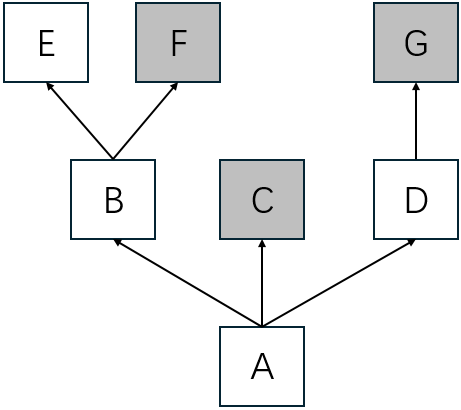
Suppose we have above multiple inheritance hierarchy. A method named m is defined in C, F, and G. Once m is callled on an instance of A, which m method will be invoked?
class E:
    pass

class F:
    def m(self):
        print("m in F")
        # super().m()

class G:
    def m(self):
        print("m in G")

class B(E, F):
    pass

class C:
    def m(self):
        print("m in C")

class D(G):
    pass

class A(B, C, D):
    pass

def main():
    a = A()
    a.m()
    print(a.__class__.mro())

if __name__ == "__main__":
    main()

# execute above code and we get
In [13]: %run lab.py
m in F
[<class '__main__.A'>, <class '__main__.B'>, <class '__main__.E'>, <class '__main__.F'>, <class '__main__.C'>, <class '__main__.D'>, <class '__main__.G'>, <class 'object'>]
Explanation
- According to MRO, the
mdefined in F is invoked. - Generally speaking, MRO follows a depth first, left to right order.
- Try uncommenting the
super().m()line and themdefined inCwill be invoked additionally. Following the MRO, the one afterFisC, sosuper()inmofFmeansC.
Regular Expression
The re module provides regular expression support in Python.
Suppose we have a text file with below contents
123
hello world
lucky 523
F789E65
The End
Using re we can easily capture the lines with figures.
import re

def main():
    regex = re.compile("\d")
    in_file = open("sample.txt")
    for line in in_file:
        if regex.search(line):
            print(line, end="")
    in_file.close()

if __name__ == "__main__":
    main()
Explanation
regexis a compiled regular expression for better performance, usingre.compilefunction.re.searchis used in above case. Ifre.matchwas used, only123would be printed out, becausere.matchapplies the regular expression to the beginning of the string.
Extract Matching Part
Suppose we need to do one step further, extracting the matching part. For example, to extract consecutive number characters from the file
123 --> 123
hello world
lucky 523 --> 523
F789E65 --> 789 and 65
The End
Use below code snippet
import re

def main():
    regex = re.compile("\d+")
    in_file = open("sample.txt")
    for line in in_file:
        matching_nums = regex.findall(line)
        output_str = f"{line.strip()} --> {' and '.join(matching_nums)}" if matching_nums else line.strip()
        print(output_str)

    in_file.close()

if __name__ == "__main__":
    main()
Explanation
re.findallreturns a list containing all the matching entries.- If more control is desired,
re.finditeris the function to use.
Raw Strings for Regular Expression
In Python, regular expressions recognize special characters such as \n for a newline, \t for a tab, and \\ for a literal backslash. In addition, Python itself processes escape sequences in string literals. Together, these two layers of escaping can easily become a source of confusion.
import re

def main():
    s = "\\ten" # \ten
    print(s)
    # regex = re.compile("\\ten")
    regex = re.compile("\\\\ten")
    print(regex.search(s))

if __name__ == "__main__":
    main()
Explanation
- In
re.compile("\\ten"), the string literal"\\ten"is first processed by Python as a norma string. During this stage, escape processed, so the value ultimately passed tore.compilefunction is\ten. \tis recognized as a tab when compiling the regular expression. That’s the reason why the commented out line does NOT work.
To make regular expressions easier to write and read, raw strings can be used. A raw string looks like a normal string with a leading r character. Raw strings can be used
- single quotation marks
- double quotation marks
- triple quotation marks to span lines
Raw strings tell Python to NOT process escape sequence in this strings.
>>> r"Hello" == "Hello"
True
>>> r"\the" == "\\the"
True
>>> r"\the" == "\the"
False
>>> print(r"\the")
\the
>>> print("\the")
   he
Back to above regular expression case with raw string being used
regexp = re.compile(r"\\ten")
Explanation
r"\\ten"makes Python not process escape sequence, so\\tenis passed tore.compilefunction.- In
re.compile,\\means to form a backslash, so\\tenis ’translated’ to\ten.
Substitute Text with Regular Expressions
Regular expressions can be used for string substitution.
import re

def main():
    s = "the the quick brown fox jumps over the the the lazy fox"
    regex = re.compile(r"(\bthe\s+)+")
    processed_s = regex.sub("the ", s)
    print(processed_s)

if __name__ == "__main__":
    main()
Explanation
regex.sub("the", s)means to search patternregexins, and replace the matching entries to"the".()meta characters in regular expression mean a group.
re.sub also accepts a function for more complex substition. Suppose we want to convert all three-letter words to uppercase.
import re

def main():
    s = "the quick brown fox jumps over the lazy fox"
    regex = re.compile(r"\b\w{3}\b")
    processed_s = regex.sub(lambda m: str.upper(m.group()), s)
    print(processed_s)

if __name__ == "__main__":
    main()
Explanation
regex.subaccepts a function, and a lambda expression is passed to convert the matching entry to uppercase.re.Matchobject represents the matching entry, and it contains much useful info- The whole match can be retrieved from
re.Matchobject viagroup(0)method or simplygroup() - The separate groups can be retrieved from
re.Matchobject viagroup(<num>). For example, to retrieve the first group, usegroup(1).
- The whole match can be retrieved from
Types
The type built-in function returns an object representing the type of the object
>>> type(523)
<class 'int'>

>>> type("Python")
<class 'str'>

>>> type(1) == type(2)
True
>>> type(1) == int
True

>>> type({}) == dict
True
The __class__ on instance and __base__ on type also return a type object.
# 1.__class__ causes error because python expects fractional part after `1.`
>>> (1).__class__
<class 'int'>

>>> (1).__class__.__base__
<class 'object'>

>>> type(1) == (1).__class__
True
isinstance(<inst>, <type>) and issubclass(<sub_class>, <super_class>) also provide useful type info.
>>> class Person:
...     pass
...

>>> class Student(Person):
...     pass
...

>>> alex = Student()
>>> isinstance(alex, Person)
True
>>> issubclass(Student, Person)
True

# notice the __main__ module is part of the full qualified name
>>> type(alex)
<class '__main__.Student'>
>>> alex.__class__.__base__
<class '__main__.Person'>

>>> type(alex).__name__
'Student'
Duck Typing
If it walks like a duck and it quacks like a duck, then it must be a duck.
This is Python’s philosophy for determining whether an object is of the desired type — focusing on its interface rather than its declared type, as languages like Java and C# do. As a result, the ntimes function below works for any type that supports multiplication operator:
>>> def ntimes(obj, times):
...     return obj * times
...

>>> ntimes(2, 3)
6
>>> ntimes("2", 3)
'222'
>>> ntimes([7, 8, 9], 3)
[7, 8, 9, 7, 8, 9, 7, 8, 9]
Dunder Methods for Type Behaviors
In Python some methods are named with leading and trailing double underscores, for example __init__, __repr__ and __str__. These methods have special meaning to Python and are not meant to be called directly. For instance, __str__ is called by Python when it needs a human-readable string representation of an object.
class Color:
    def __init__(self, red, green, blue):
        self.red = red
        self.green = green
        self.blue = blue

    def __str__(self):
        return f"Color(r={self.red}, g={self.green}, b={self.blue})"

>>> c = Color(255, 128, 23)
>>> print(c)
Color(r=255, g=128, b=23)